How to Set Scent Schedules in a Phone App
A phone app can turn a cold-air diffuser into a quiet daily routine. But scheduling depth varies widely. Some models support a few timers, while others handle many time slots and room settings. Every Mila Marie Scents diffuser is controlled over Bluetooth rather than Wi-Fi, which means all of this happens from inside the house. Follow these steps to connect your diffuser, choose the right intensity, build a weekly plan, and fix common Bluetooth issues.
Step 1: Connect Your Diffuser to the Smartphone App
To set up scent schedules from a smartphone app, first pair the diffuser with the correct mobile app while standing close to the unit.
Start with the model name. Check the quick-start card, product label, or maker’s setup page before downloading anything. Some brands use their own app. Others use a shared smart-home app. The wrong app can leave the diffuser invisible, even when Bluetooth is working.
Plug in the diffuser and keep it upright. Turn on Bluetooth on your phone. Then open the app and choose the option to add a device. Stay within a few feet during pairing. If the app asks for location access, allow it while setup runs. Some phones use that permission to scan for nearby Bluetooth devices.
Give the diffuser a clear name such as “Entryway” or “Office.” This small step helps when you control more than one unit. A compatible app may let users rename systems and manage more than one connected diffuser in one place. The control method is Bluetooth, a short-range wireless link between nearby devices. That is worth being clear about, because it sets the limits of everything that follows. Mila Marie Scents diffusers — the ECHO Mini, Elite Mini Pro, ECHO, PULSE, HALO Tower and INFINITY alike — pair over Bluetooth, not Wi-Fi. They do not join your home network and there is no remote access: you can change settings when you are in the house and within range of the unit, and not from the office or from a hotel. Bluetooth is the deliberate choice because a direct link to the diffuser is more reliable than one that depends on a router staying up, and the honest cost of that choice is exactly this: no control from away.

If pairing fails, move the phone closer. Confirm the diffuser has power. Turn Bluetooth off, wait a few seconds, and turn it back on. You can also close the app and reopen it. If the diffuser appears offline, it usually means the app cannot detect it through Bluetooth.
Mila Marie Scents keeps this first step simple with app-controlled cold-air options such as the ECHO Mini wireless diffuser. Its intended use is clear: smaller rooms that need quiet, waterless scenting with phone control.
By now you should see the diffuser inside the app and be able to change a setting while standing nearby.
Step 2: Choose the Fragrance, Room, and Starting Intensity
Choose the fragrance and starting intensity based on the room’s size, airflow, and purpose. Begin lower than you think, then raise the setting only after testing the space.
First, select the diffuser location in the app. A bedroom, entryway, open living area, and small office need different plans. A scent that feels soft near a sofa may feel strong in a narrow hall. If the diffuser connects to HVAC, the scent may travel farther than it would from a freestanding unit.
Next, select the oil. Use only fragrance oil made for your diffuser’s system. Waterless cold-air nebulizers do not use a water tank. They turn compatible oil into a fine dry mist, so adding water can affect the unit’s output and may cause problems.
Open-oil systems give you more freedom. Proprietary systems limit you to brand-specific bottles or cartridges. That trade-off often sits at the centre of the buying decision, since models with deeper scheduling may tie you to a narrower fragrance system.
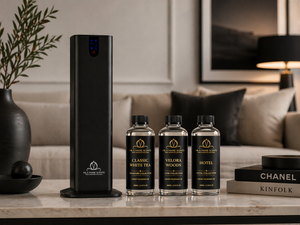
Mila Marie Scents offers several named fragrance choices for a luxury home scent plan. Classic White Tea suits a clean, airy setting. Velora Woods brings warm wood notes with citrus and spice. Escape fits a softer, polished mood, with white tea, aloe vera and sandalwood. If you want to compare scents before choosing a full bottle, the Scent Card Sample Pack, $15 for 15 scent cards, gives you a way to narrow the shortlist first.
Set the first intensity at the low or middle range. Give the room time to settle before changing it. Your nose can adjust quickly when scent runs without a break. That is why a lower setting with pauses often feels fresher than a high setting that runs all day.
For a bedroom, start with a short evening window. For an entryway, schedule scent shortly before the busiest arrival period. In a small office, match the schedule to occupied hours rather than leaving the unit on during an empty room.
Think of the first setting as a test value, not a final answer. Record the room, oil, intensity, and run time in your phone notes. That gives you a useful baseline after one day.
By now you should have one fragrance assigned to one room, plus a starting intensity that feels restrained.
Step 3: Create the Daily or Weekly Scent Schedule
A useful scent schedule has an on period, a pause when the room is empty, and another on period when people return.
Open the schedule screen and choose the days first. Then add a start time and stop time. Set the intensity for that time block if the app supports separate levels. Save the block before adding another one. This prevents the app from losing your work when you move between screens.
A simple weekday plan might look like this:
- Morning: run at low intensity before the household starts moving.
- Daytime: pause while the home is empty.
- Evening: resume at low or medium intensity when people return.
- Night: stop before bedtime if the room is a bedroom.
For a small office, use the first block shortly before opening. End it near closing time. Add a second block only if the space needs scent during a later meeting or event.
Weekend schedules should not copy weekdays by default. You may wake later, spend more time at home, or use different rooms. Make a separate weekend plan if your app supports it. If it does not, use the same schedule and adjust the start time manually when needed.
The number of schedule slots differs by model. Check how many separate blocks your app allows before you plan around it, because that ceiling decides whether you can keep distinct plans for weekdays, weekends, guest visits, and seasonal changes.
Do not assume voice control is part of the picture. Mila Marie Scents diffusers do not work with Alexa or Google Home and do not integrate with a smart-home platform, because Bluetooth is a direct phone-to-device link rather than a network connection. The app is the only control surface. Elsewhere in the category, a “works with” badge can also mean far less than changing every schedule setting by voice, so check the exact routine actions before buying anything on that basis.
With Mila Marie Scents, the PULSE is a useful model to consider when a larger room needs Bluetooth control. At $149 it lists coverage up to 1,800 square feet and waterless cold-air operation, and it can either connect to HVAC ductwork or run standalone in one large room. For a home connected to central air, the Mila Marie Scents HVAC diffuser collection includes options matched to different HVAC sizes.
After saving the first schedule, watch the next start time. Because the link is Bluetooth, the phone has to be near the unit for a change to land, so make your edits while you are standing beside the diffuser rather than from the next floor. A schedule you have already saved keeps to its own times without the phone, but you cannot reach in and alter it while you are out. Test one future start time before trusting the routine for a trip or an event.
By now you should have a saved plan for at least one day, with a clear pause when the room is empty.
Step 4: Test Coverage and Fine-Tune the Schedule
Test scent coverage by walking through the room at different times, not by standing beside the diffuser.
Run the schedule for one full day. Enter the room after the diffuser has been off for a while. Notice the first impression near the door. Then move toward the far side of the room. If the scent fades sharply, the unit may need a better position or a longer run window.
Keep the diffuser away from a blocked corner. Avoid placing it behind furniture where the mist cannot spread. In an open-plan home, mark the point where the scent becomes faint. That helps you decide if one unit is enough or if you need separate zones.
Change one setting at a time. Increase the run window before raising intensity if the room feels uneven. Raise intensity only when the scent remains too light after the schedule has had enough time to work.
Keep a short test log for three days. Note the time, room, intensity, and your first impression. A scent can feel different in the morning than it does after cooking, cleaning, or opening windows.

Coverage also depends on the diffuser type. A small cordless unit may suit a bedroom or office. An HVAC diffuser can spread fragrance through connected rooms, but the result depends on the HVAC setup. Mila Marie Scents lists the INFINITY HVAC cold-air diffuser for larger connected spaces, while its Elite Mini Pro is aimed at wireless room scenting with smartphone control. Match the model to the space before you tune the schedule.
One more test matters: leave the phone in another room, or leave the house, and see whether the next block still runs. A saved schedule should keep its times on its own. What you will not be able to do from away is change it, because there is no network path to the unit, so plan any adjustment for when you are home.
Use this rule: adjust placement first, schedule second, and intensity last. That order keeps the fragrance balanced and helps conserve oil.
Step 5: Save, Maintain, and Troubleshoot Your Automated Routine
Save the final schedule, check the oil level, and test one future start time before treating the routine as automatic.
Tap save after every change. Then close the app and reopen it. Confirm that the days, start times, stop times, and intensity levels remain visible. Some apps show a schedule on the phone without confirming that the diffuser received it.
Keep the oil bottle upright when moving the diffuser. Remove the bottle first if the model allows it. This reduces the risk of spills and helps protect the unit’s internal parts.
Waterless cold-air units do not need a water tank. Do not dilute compatible oil with water or a carrier oil unless the maker specifically says you can. Oils made for another type of diffuser may clog the nozzle or change the mist.
Quick Bluetooth troubleshooting
- Device not found: Turn on Bluetooth and move within a few feet.
- App says offline: Check power, then close and reopen the app.
- Schedule did not run: Confirm the correct day and time zone.
- Output sounds unusual: Check the oil level and fill line.
- Intensity seems unchanged: Wait through one full cycle before making another adjustment.
Connectivity can be the weak point in an otherwise polished setup. An app command can take a moment to reach the unit, and a Bluetooth link will drop if you wander out of range part-way through a change. That is why a live test beats an assumption.
Keep a spare note of your preferred settings. Write down the room, fragrance, intensity, and schedule. If the app resets after an update or device change, you can rebuild the routine quickly.
For a seasonal change, replace the fragrance only after checking the nozzle and bottle connection. White Tea can suit a crisp daytime plan, while Velora Woods may feel better in evening spaces. Test a new oil for a short window before assigning it to the whole week.
Frequently Asked Questions
How do I set up scent schedules from a smartphone app?
To set up scent schedules from a smartphone app, pair the diffuser first, choose the room and fragrance, then add start and stop times. Set a low starting intensity and save the schedule. Test one future cycle before relying on it. Mila Marie Scents diffusers pair over Bluetooth rather than Wi-Fi, so the phone has to be near the unit to make a change; a saved schedule then runs on its own, but you cannot adjust it while you are away from home, and there is no voice or smart-home control.
What is a heat free cold air diffuser?
A heat free cold air diffuser spreads compatible fragrance oil without warming it or mixing it with water. The unit uses airflow and atomization to release a dry scent mist. This makes it different from an ultrasonic water diffuser. Always use oil made for the specific diffuser system, since formulas and bottle fittings vary.
What should I look for in a cold air diffuser bundle?
A cold air diffuser bundle should include the diffuser, compatible fragrance oil, and the parts needed for setup. Check the stated room coverage and app controls before buying. Mila Marie Scents does not sell bundles as such, but two units ship with oil included: the HALO Tower at $299 with three 200ml oils, and the INFINITY at $399 with three premium oils. The ECHO Mini, Elite Mini Pro, ECHO, PULSE and Elite Car Pro are sold without oil. Confirm the exact oil compatibility for your chosen unit.
Can I mix and match fragrance oils?
You can mix and match fragrance oils only when both oils are made for your diffuser’s atomizer system. Test a small blend outside the unit first. Keep one scent dominant so the result stays clear. Proprietary systems may require brand-specific bottles, while open-oil models may accept compatible third-party oils.
Can I try before I buy home fragrance?
Yes, you can try before you buy home fragrance by using a sample set. A sample lets you judge the first impression and the dry-down before choosing a full bottle. Mila Marie Scents offers a Scent Card Sample Pack, $15 for 15 scent cards, which suits shoppers who want to compare profiles at home; room strength is the one thing only the diffuser itself will tell you.
Conclusion
Start with one room and a low intensity setting. Build a short schedule, test it for a day, then adjust placement before increasing output. For a polished home scent plan, explore Mila Marie Scents and choose the diffuser size that matches your room or HVAC system. Your next step is simple: pair the unit, name the space, and save the first schedule.
Best-selling diffusers & fragrances for your home
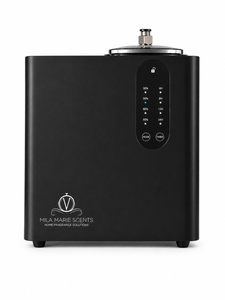
Which Diffuser Is Right for You?
| Feature | INFINITY | HALO Tower |
|---|---|---|
| Price | $399.00 | $229.00 |
| Coverage | Up to 16,000 sq ft | Up to 4,000 sq ft |
| Type | HVAC / Whole-Home | Floor Standing |
| App Control | Yes (Bluetooth) | Yes (Bluetooth) |
| Free Oils Included | Yes (3 Oils) | Yes (3 Oils) |
| Warranty | 1-Year | 1-Year |
| Guarantee | 30-Day | 30-Day |
Swipe to compare →
Get 10% Off Your First Order
Join the Mila Marie family for early access to new fragrances, exclusive offers, and expert scenting tips.